
# Cartridges
A GTK4 + Libadwaita game launcher
[![GNOME Circle][circle-image]][circle-url]
[![Flathub][flathub-image]][flathub-url]
[![Build status][github-actions-image]][github-actions-url]
[![Translation Status][weblate-image]][weblate-url]
[![License][license-image]][license-url]
[![Code style][code-style-image]][code-style-url]
[![Discord][discord-image]][discord-url]
[circle-url]: https://circle.gnome.org
[circle-image]: https://circle.gnome.org/assets/button/badge.svg
[github-actions-url]: https://github.com/kra-mo/cartridges
[github-actions-image]: https://github.com/kra-mo/cartridges/actions/workflows/flatpak-builder.yml/badge.svg
[license-url]: https://github.com/kra-mo/cartridges/blob/main/LICENSE
[license-image]: https://img.shields.io/github/license/kra-mo/cartridges
[code-style-url]: https://github.com/psf/black
[code-style-image]: https://img.shields.io/badge/code%20style-black-000000?style=flat
[weblate-url]: https://hosted.weblate.org/engage/cartridges/
[weblate-image]: https://hosted.weblate.org/widgets/cartridges/-/cartridges/svg-badge.svg
[discord-url]: https://discord.gg/4KSFh3AmQR
[discord-image]: https://img.shields.io/discord/1088155799299313754?color=%235865F2&label=discord&logo=discord&logoColor=%23FFFFFF
[flathub-url]: https://flathub.org/apps/hu.kramo.Cartridges
[flathub-image]: https://img.shields.io/flathub/v/hu.kramo.Cartridges
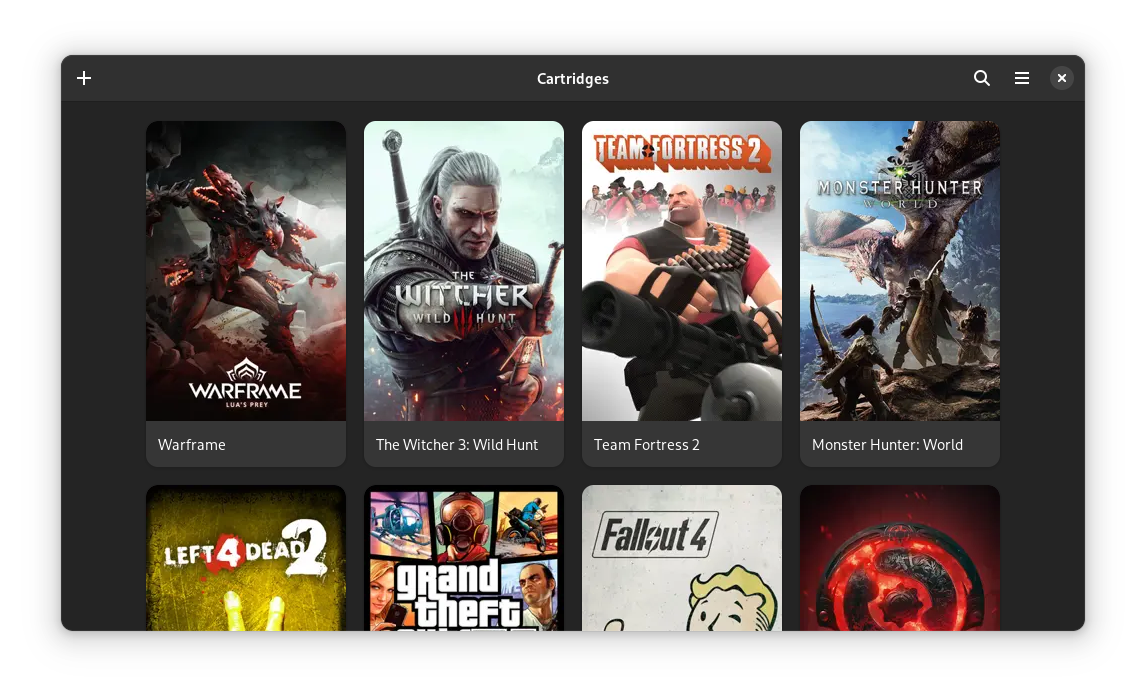
# The Project
Cartridges is a simple game launcher written in Python using GTK4 and Libadwaita.
## Features
- Manually adding and editing games
- Importing games from Steam, Lutris, Heroic, Bottles and itch
- Support for multiple Steam install locations
- Hiding games
- Searching and sorting by title, date added and last played
- Automatically downloading cover art from [SteamGridDB](https://www.steamgriddb.com/)
- Searching for games on various databases
- Animated covers
For updates and questions, join our [Discord server][discord-url]!
# Installation
## Linux
### Flathub (Recommended)
